Git, agents and chats.
See where Claude Code, Codex, opencode and supported agent sessions are working. Continue a conversation from your phone, open a remote terminal, compare parallel work and keep repository state visible.
One view of the work, from desktop or phone.
FluxGit is a control center for supported coding agents and their repositories, combining agent conversations with reviewable Git actions.
Find the repository that needs you, continue a supported conversation, or open an authorized desktop terminal when the tool has no dedicated remote chat.
Combine Claude Code, Codex and opencode sessions across repositories. Use separate branches or worktrees to organize parallel edits.
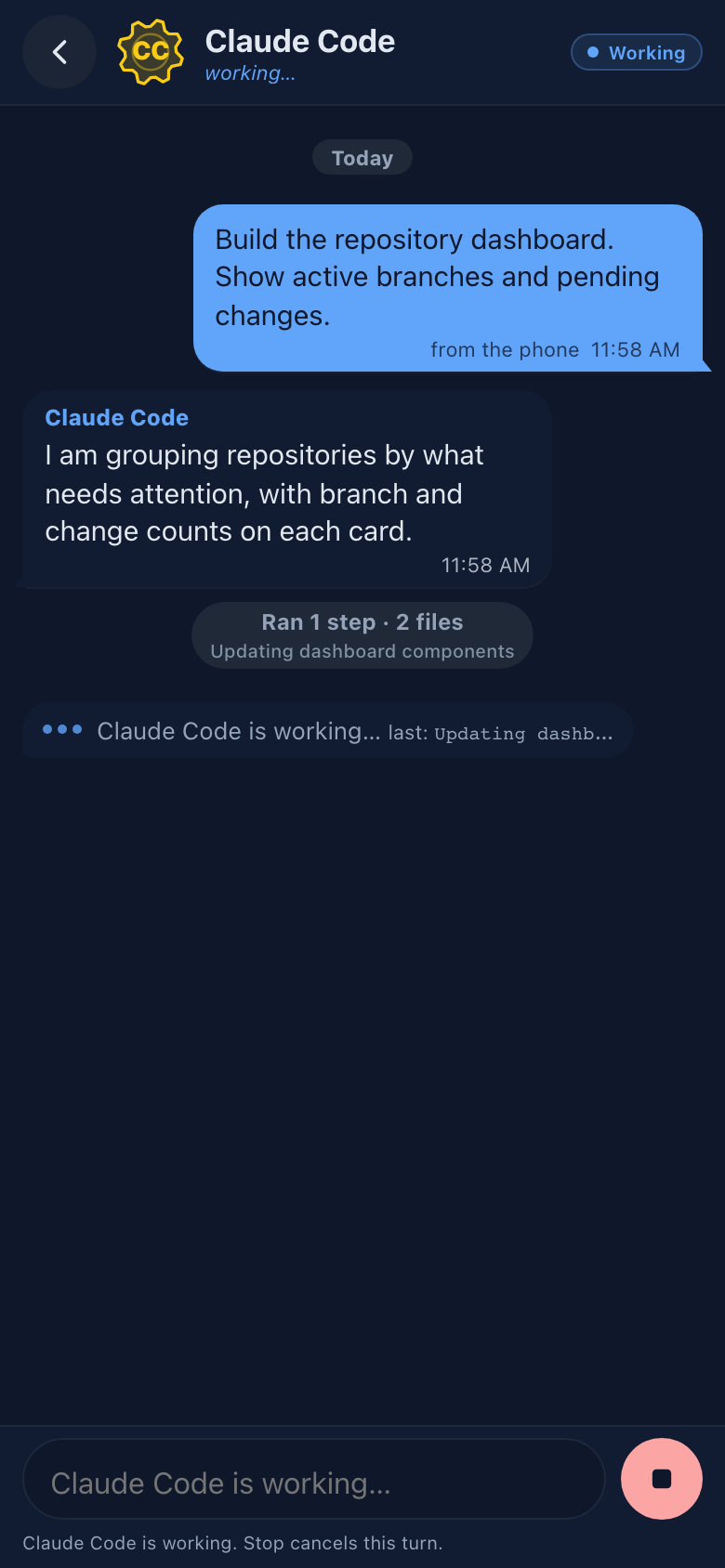
The real FluxGit interface, on synthetic demo data.
These are real screenshots of the FluxGit desktop app, captured with synthetic demo repositories, branches and commits only — no real customer or local repository data.


The whole idea, in 90 seconds.
The agent proposes, you approve, your own risky clicks stay guarded, and a full Git cockpit sits underneath — one silent walkthrough of the real app.
Two ways to make Git safe for agents.
There are two bets on how version control should handle AI agents. One is to let the agent commit freely and contain the fallout: sort its edits into branches, review afterward, roll back when it overreaches. GitButler does that well, and it is a reasonable bet if you trust the agent to write.
FluxGit takes the other bet. Through FluxGit, the agent receives no direct Git write endpoint. It proposes a change; FluxGit shows the operation-specific impact, risk and recovery information where applicable; nothing touches your repository until you approve it in the app. Approve before it runs, instead of reviewing after it already did.
Contain-and-review-after trusts the agent to write and gives you a good cleanup. FluxGit's approve-before-it-runs path exposes proposals instead of a direct Git mutation endpoint. Every proposed operation has an operation-specific preview and risk/recovery information where applicable, and FluxGit runs it only after your click in the desktop app.
If you would rather the machine ask first, that is the whole product.
Built for the moments Git gets dangerous.
Most Git tools make commit and push easier. FluxGit focuses on the expensive moments: conflicts, rebases, resets, dirty worktrees, lost commits, monorepos, submodules and multi-repo drift.
FluxGit Full
A perpetual desktop license for one person, on up to 3 of your computers: macOS, Windows or Linux. Includes 12 months of remote control and updates.
After the included year, automatic renewal is 9.99 USD per year. Cancel future renewals in Paddle.
Buy FluxGit FullOne cockpit for the Git work that normally breaks flow.
FluxGit combines a visual Git graph with safety rails, recovery, conflict resolution, semantic diff fallback, optional AI-assisted commit workflows, MCP for agents with human-approved writes, and local-first privacy controls. Using Claude Code, Cursor or another MCP agent? The three-step setup.
One place for your coding agents
See agents by repository, continue conversations, use remote terminals, receive bounded alerts and connect every session to reviewable Git state.
MCP write-with-UI-handshake
Your AI agent proposes through twelve operation tools; operation.cancel can withdraw its own pending proposal. FluxGit shows the operation-specific preview, risk and available recovery context, and you decide. repo.brief returns branch, status, recent history and worktree context in one typed response so the agent can orient itself before acting.
Semantic diffs
Tree-sitter structural diffs for 60+ languages. Moved code stops reading as churn, agent proposal cards open with the structural summary first, and unparseable files fall back, labeled, to the plain patch.
Safety rails
Risk levels, explicit decisions, safer alternatives and contextual recovery before destructive Git operations.
Flux restore points
Recovery-oriented checkpoints for dangerous history operations, designed to make rebase and reset less scary.
Reflog recovery
Turn local HEAD movements into visible rescue actions, including recovery branch creation after reset or branch deletion.
Trinity conflicts
Guided 3-way conflict workspace for base, current, incoming and final result review.
Predictive conflicts
Beta preflight branch integration checks to warn about likely merge conflicts before the user starts a risky operation.
Commit Studio
A larger focused commit surface for staging, reviewing diffs and composing commits without fighting cramped side panels.
The full toolbox
Blame, per-file history you can step through commit by commit, bisect, merge strategies, interactive rebase, content search across the repo and any file's contents at any commit. The basics are all here, wrapped in the same safety rails.
Fleet Radar
See which selected local repositories are dirty, behind, ahead, divergent or need attention, and which coding agents are working in each, without opening them one by one.
AI Cortex
Provider-aware AI-assisted commit workflows when configured, with local-first secret handling and normal Git still usable without AI.
Monorepo tools
Partial clone, sparse checkout, focused branch filtering and performance-conscious repository refresh policies.
Parallel workspaces
Run several agents at the same task in parallel worktrees, compare the attempts side by side, merge the winner into your checkout and clean up the rest. Submodules and parent-child repos ride the same guarded flows.
Safety Timeline
Restore points and HEAD movement share one recovery timeline. Covered history operations expose a recovery path; destructive operations without a checkpoint stay explicitly marked. Agents can read it too, read-only.
Operation Audit
A per-repository, hash-chained record of what FluxGit did and who caused it — you, or the agent that proposed it. A deleted entry breaks the chain, so the panel can say "intact" and mean it.
Designed around real workflows, not isolated commands.
Branch status, remote drift, dirty submodules, reflog hints and Fleet Radar attention signals.
Checkout, discard, rebase, merge, cherry-pick and reset flows explain consequences before continuing.
Reflog recovery, restore points, conflict panels and contextual recovery avoid silent destructive guesses.